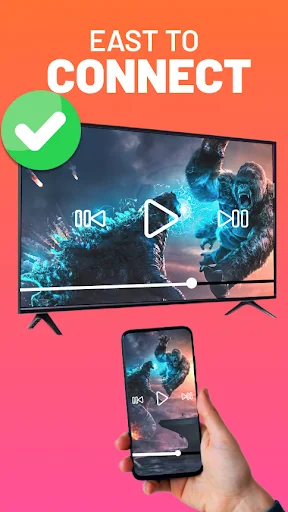
Screen Mirroring HD Cast To TV
Mirror your phone to any TV wirelessly in seconds. Watch sports, play games, share photos, and present work – all in stunning HD quality without cables or complicated setup.
Download on Google PlayWhy Thousands Choose Our Screen Mirroring App
Connect Without Cables
Forget tangled wires and confusing setups. Connect your phone to your TV wirelessly with just a few taps. Enjoy instant screen mirroring that works every time, letting you focus on what matters – your content.
Works With Every TV
Compatible with all major streaming devices including Chromecast, Roku, Fire TV, Xbox, and any DLNA receiver. No matter what TV you own, our app creates a seamless connection so you never face compatibility issues.
Control Everything From Your Phone
Your phone becomes a powerful remote control. Adjust volume, pause, play, skip forward, rewind, and navigate – all from your device. No need to search for the TV remote or get up from your seat.
Crystal Clear HD Quality
Experience your favorite content the way it was meant to be seen. Stream videos, movies, photos, and games in high definition quality that brings every detail to life on your big screen.
Want to watch movies on a large screen from your mobile apps? Or want a thrilling adventure of playing games on a big screen? Screen mirroring smart view mira cast is the ultimate solution. Whether you are a cricket lover who wants to enjoy a live cricket match on a big TV screen with high quality or you are excited to watch a football match with your friends and family, screen mirroring for smart tv is your best companion. Cast to screen mirroring and enjoy streaming your phone to tv!
Screen Mirroring - Mobile to tv cast: Share your phone's screen, whether you're gaming, browsing photos, or enjoying movies and shows. With screen share Cast to TV, Screen Mirroring, enjoy the big screen experience. All controls in your hands with Remote control feature you can control the tv screen with your phone - volume, pause, forward, rewind, and more, all the screen share cast to tv. With screen mirroring for smart tv you can enjoy movies, songs or even you can cast photos and videos from your gallery on a large tv screen with high quality by smart screencast.
Cast for Chromecast app is a perfect companion for professionals seeking to showcase demos and presentations on a larger screen. And for the families or friends who want to enjoy the travel slideshows and browse photos together with mirroring cast screen sharing all is possible.
Miracast android to tv: Screen mirroring miracast android to tv create a smart mirror display of videos and pictures from mobile phone to TV screen. Use Miracast android app to cast to TV for screening or mirroring video from android to TV screen.
TV Cast – HD Screen Mirroring: If you get bored by always looking at your small phone display, No need to worry you will get a big screen display phone experience by mirroring your phone to a TV screen with TV Cast – Screen Mirroring HD.
screen mirroring for all tv: Screen mirroring cast to tv is supported with all the devices such as Chromecast, Roku, Roku TVs, Xbox, Fire TV, and Fire Stick and Other DLNA receivers.
Unique Features of Screen Mirroring Cast to TV smart view App:
- Wireless Connectivity: screen mirroring enables effortless screen sharing from your mobile to your TV without the need for cables. Enjoy the smart tv cast with wireless connectivity.
- Smart View Technology: Experience a smooth mirroring experience with the power of Smart View screen share.
- Wide Compatibility: screen mirroring miracast is compatible with a wide range of smart TVs and devices, including Chromecast, Roku, IPTV, and FireTV, ensuring that you can enjoy screen mirroring and casting regardless of the brand or model of your TV. Enjoy the ultimate visual experience with Cast for Chromecast!
- Media Casting: cast videos, movies, and music from popular media streaming apps directly from your mobile device to the TV screen.
- Screen Sharing: Share presentations, photos, documents, and more with ease. Whether you're in a business meeting or sharing memories with loved ones, mira cast smart view allows you to effortlessly share your screen on the TV.
- Control display with phone: with this mirroring app pause, volume, forward/rewind, previous/next with your phone
- User-Friendly Interface: smart tv cast screen hare is designed with a user-friendly interface, easy to use.
- Cast video to screen
- Cast movie to screen
- Cast photo to screen
- Hd video screen mirroring
- Wireless display
- Easy screen sharing
- Smart screencast
User Guide
- Make sure your TV support a wireless display.
- Both devices must be connected to the same Wi-Fi network.
- Open the app and Grant all the required permissions for the app to access data.
- Select any video file you want to share from your phone to TV screen.
- Press the "Mirror Screen" button, and done it will cast your screen to TV.
Unlock the full potential of your mobile device and TV with our Screen Mirroring Cast to TV app. Experience the convenience of seamless mirroring, media casting, and screen sharing.
See How Easy Screen Mirroring Can Be