
Satellite finder(AlignDish)
Stop struggling with poor signal and complicated setup. Get perfect dish alignment using AR technology, GPS guidance, and step-by-step instructions – no technical skills needed.
Download on Google PlayEverything You Need for Perfect Alignment
See Satellites in AR
Point your phone at the sky and watch as augmented reality shows you exactly where satellites are located. Simply adjust your dish until the lines align – it's like having x-ray vision for satellite signals.
Get Exact Angles Instantly
No more guessing or endless adjustments. The app calculates precise azimuth and elevation angles for your location, ensuring you get the strongest possible signal on your first try.
Follow Simple Step-by-Step Guidance
Whether you're a beginner or a pro, our clear instructions walk you through the entire process. Select your satellite, follow the prompts, and enjoy perfect TV reception in minutes.
Find Signals Anywhere
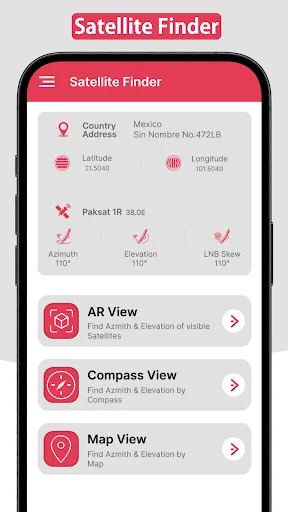
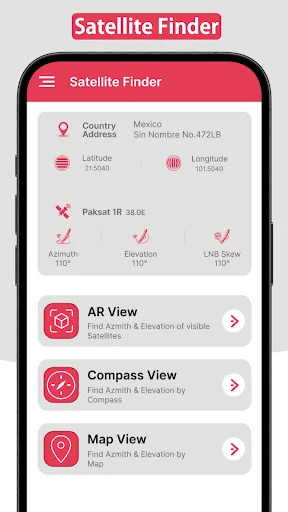
Use GPS, compass, or map-based tools to locate satellites even in remote areas. Multiple finding methods mean you'll succeed no matter where you are or what device you have.
Quick Satellite Pointer – Your Essential Dish Alignment Tool!
Struggling with satellite dish alignment? The Quick Satellite Pointer is here to make the process effortless. Whether setting up a new dish or adjusting your current one, this Sat Pointer: Dish Finder tool ensures precise alignment every time. Say goodbye to signal issues and enjoy seamless TV viewing with the power of advanced technology.
With Quicksat Finder, you can quickly locate satellites, adjust your dish angle, and achieve optimal signal strength. This app has features like AR visualization, azimuth compass directions, and a detailed Quicksat Finder, ensuring you get the job done quickly and accurately.
Key Features of Quick Satellite Pointer:
- Satellite Finder: Dish Alignment – Align your dish with step-by-step guidance
- Sat Pointer: Dish Finder – Pinpoint satellite locations with precision
- Satellite Tracker: Signal Finder – Locate the best satellite signal using GPS
- Azimuth Satfinder: Dish Align – Get azimuth directions for perfect alignment
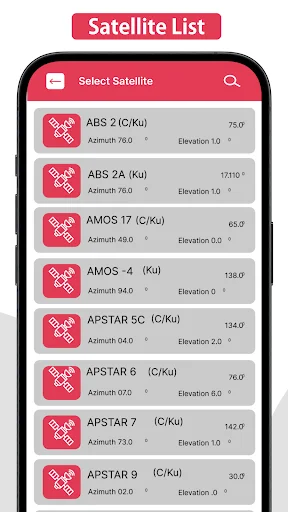
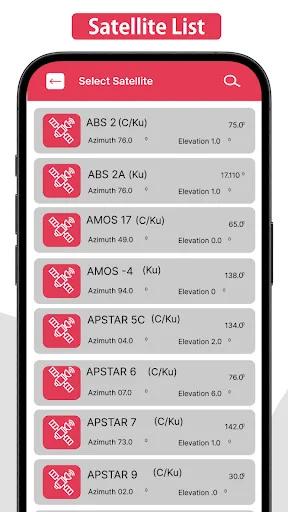
- Satellite Map List – Access a comprehensive list of satellites for selection
- AR Visualization – Use AR tools to view and adjust azimuth and elevation angles
- Elevation Angle Calculation – Find the precise elevation angle for your dish setup
- Quicksat Finder Compass – Use your device's compass to align the dish accurately
Precise Satellite Dish Alignment Made Simple
The Quick Satellite Pointer offers easy-to-follow instructions for aligning your satellite dish. Select the desired satellite from the satellite map list and use the app's tools to locate azimuth and elevation angles. With Satellite Finder: Dish Alignment, you'll receive detailed steps to point your dish in the right direction.
Augmented Reality (AR) for Real-Time Alignment
The AR feature in Sat Pointer: Dish Finder helps you visualize satellite positions in real-time. Aim your device at the sky, and the app will display the satellite's azimuth and elevation angles. Adjust your dish until the red lines align perfectly with your target satellite. This cutting-edge Quick Satellite Pointer tool simplifies the alignment process for beginners.
Compass and GPS Integration
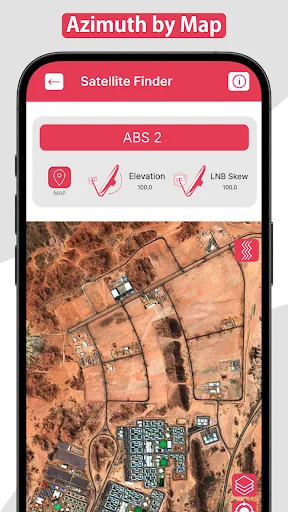
With the Satellite Tracker: Signal Finder, you can use your smartphone's compass and GPS to locate the correct satellite direction. If your device lacks a compass, the map feature in Azimuth Satfinder: Dish Align will guide you to the proper position based on your current GPS location.
Map-Based Alignment
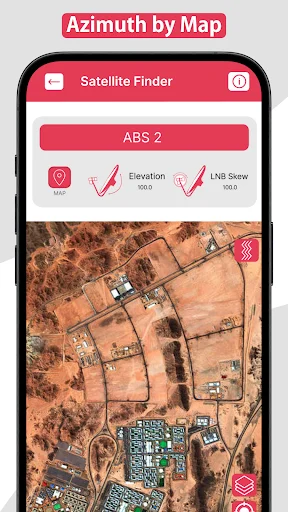
The map tool in Satellite Finder: Dish Alignment makes it easy to find your satellite signal, even in remote areas. Enter your location, and the Satellite Tracker: Signal Finder app will display the satellite's direction on the map, helping you align your dish for the best signal strength.
Elevation Angle Adjustment
Finding the right elevation angle is crucial for signal accuracy. The Azimuth Satfinder: Dish Align app's elevation angle calculation feature lets you adjust the dish to the correct degree, ensuring strong and reliable signals.
Start Using the Quick Satellite Pointer Today!
Make satellite dish alignment hassle-free with the Quicksat Finder. Whether a professional installer or a first-time user, this app provides all the tools you need, including AR visualization, azimuth compass, and the satellite map list. Get started with Satellite Finder: Dish Alignment and enjoy uninterrupted satellite TV. Optimize your dish setup today with the ultimate alignment companion!
See How Easy Alignment Can Be
Join 100,000+ Users Who Found Their Signal
Wow 😲 working fine at first time ever am use this app, am trying manual many days but Videocon d2h signal not appearing no signal display how ever am try finally am got this App in Gplay and then am trying to fix like that instructions it's mind blowing it's worked fews minutes. . Channels came. So much thanks developer 🙏👏👏🙏
The satellite finder app deserves a solid 5 stars in my opinion. Its intuitive interface makes navigating a breeze, and the accuracy in locating satellites ensures a seamless setup for dish antennas. This app has truly simplified the process, making it a go-to choice for hassle-free satellite alignment.
The best of the best I have never found a better app so easy and legit at the same time the developers of this application are the best I would love to give more than 5 star but it's all there is
Best experience using Satellite finder align dish , get accurate results within seconds. Need some work to make more user friendly anyway good work.
Best satelite finder app on playstore!works accurately and helps you navigate in a friendly manner.
Great satellite finder app...it is very heplful for my dish setting.thanks developer.